Choosing a Workbench
A workbench is a top-level operational domain. When you switch workbench, the application reconfigures: which data is fetched, which sidebar tabs and panels appear, and which map layers render. It is the first decision you make in a session, because it determines which concepts are relevant to what you are doing.
A good way to picture it: the workbench is like the mode dial on a camera. The camera body (lens, sensor, controls) stays the same, but switching from portrait to sports mode changes what the whole machine is optimised for. In Krataxis the shared body is the engine underneath: collection, credibility scoring, battlespaces, and the intel pipeline. Each workbench shows a different specialised toolset on top of it.
There are three.
At a glance
| ⚔️ Conflict | 🦠 Health | 🌋 Disaster | |
|---|---|---|---|
| Domain | Armed conflict and security | Outbreaks and disease | Natural hazards |
| Container | Battlespace | Outbreak | Battlespace |
| Signature tabs | Events, Feeds, Layers, Annotate, Actors, AOI, Stats, Intel | Cases, transmission, pathogens, epi-metrics | Events, AOI, Intel |
| Specialised tools | Actor territory, unit symbology, escalation prediction, deception detection | Case management, transmission chains, computed epi metrics | Impact-zone modelling |
| Header tint | Red | Green | Amber |
⚔️ Conflict Tracking (the default)
Armed-conflict intelligence: events (strikes, clashes, manoeuvres), actors and their territory, military units, areas of interest, critical infrastructure, escalation signals, and fused open-source intel. This is the most complete workbench. It includes actor territory hulls, standardised military symbology, escalation prediction, and deception detection.
Its sidebar carries the full tab set, plus panels for escalation, infrastructure, watchlists, collaboration, and the confidence matrix. If you do nothing, you start here. It is documented in the Conflict Tracking category.
🦠 Health & Disease
Epidemiological intelligence: disease outbreaks, individual patient cases, transmission chains, pathogens, exposure events, and computed epi metrics.
Two things to know before you start:
- Health data is outbreak-scoped. Most of it loads only once you select a specific outbreak — so pick an outbreak first, then work.
- The battlespace container doubles as the Outbreak container here. The header's battlespace button becomes the Outbreaks button, and choosing an outbreak is how you scope the picture. If you already understand battlespaces from the Conflict workbench, you understand outbreaks — same container, different label.
See the Health category.
🌋 Natural Disasters
Disaster intelligence: earthquakes, floods, wildfires, cyclones, and volcanic events, with impact-zone modelling. It shares the event and intel pipelines with Conflict but excludes conflict-specific layers. There are no units, actors, or hotspots here. Its tabs are limited to Events, AOI, and Intel.
The result is a leaner interface: fewer tabs, fewer tools, faster to read during a fast-moving response.
How to decide
Pick the domain that matches the thing you're tracking, not the region:
- Tracking forces, incidents, and who-did-what → Conflict.
- Tracking cases, spread, and exposure → Health.
- Tracking a hazard and who or what it threatens → Disaster.
If you are monitoring a single crisis that spans domains (for example, a conflict with a humanitarian-health dimension), most analysts keep a battlespace in Conflict for the security picture and an outbreak in Health for the epidemiological one, and switch between them. The two containers can cover the same geography without interfering with each other.
Switching workbenches
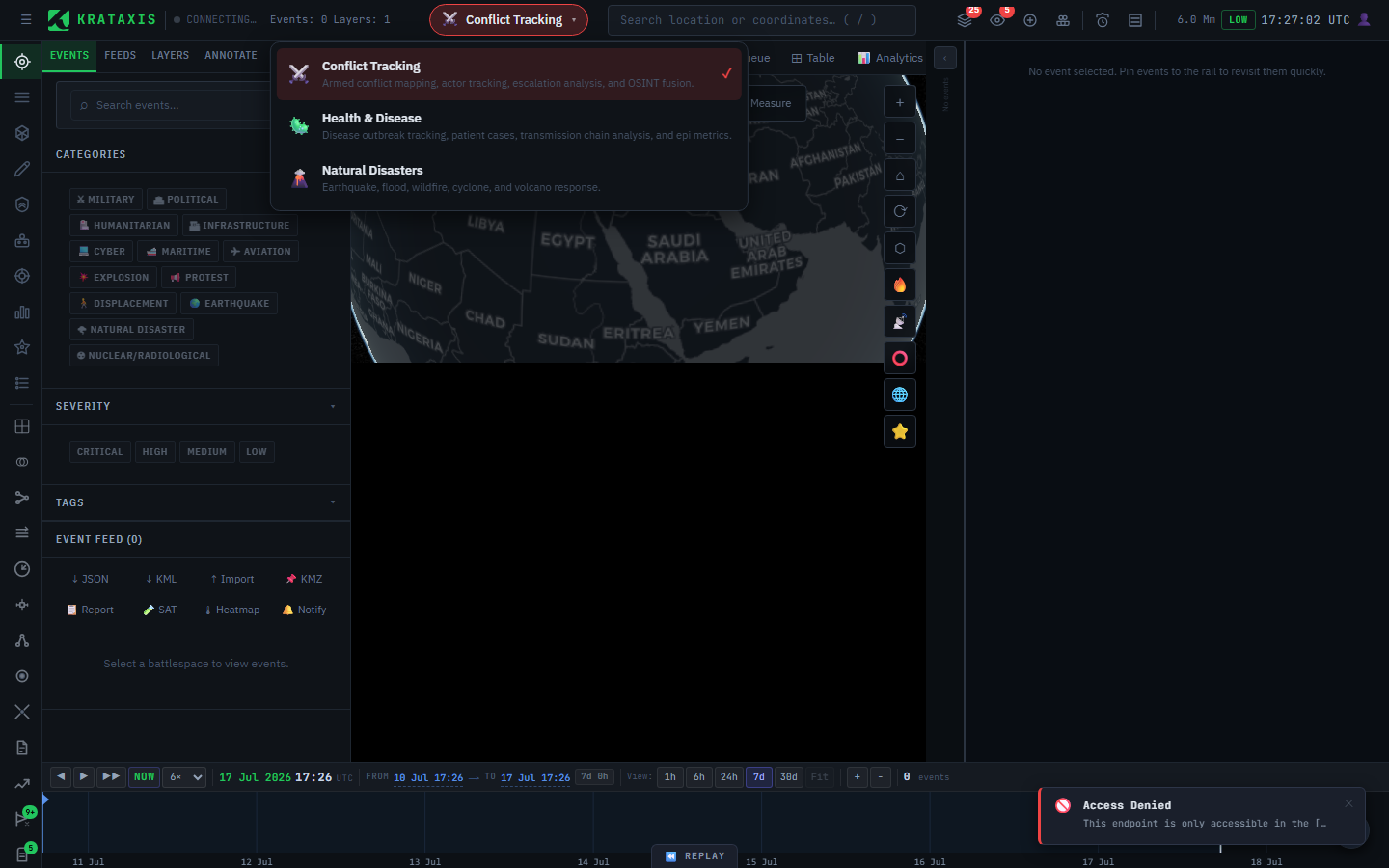
The workbench switcher is the coloured pill in the centre of the header. Click it to open a dropdown that lists all three domains with descriptions. The active one carries a ✓ mark. Pick another and the workstation reconfigures immediately: panels reset and the relevant data reloads.
You can also switch from the command palette (Ctrl+K or Cmd+K). Type "conflict", "health", or "disaster" and select the switch command.
The active workbench is in the URL. A link you copy carries your workbench choice. Anyone with access who opens that link lands in the same domain you were in. This is useful when you share a view with a teammate.
Which one am I in?
Three quick tells:
- The colour gradient across the header bar (red = Conflict, green = Health, amber = Disaster).
- The colour of the switcher pill.
- The set of tabs in the sidebar.
If you cannot find a tab you expect (for example, Actors), you are probably in the wrong workbench for that task, not looking at a fault.
Where to next
- Battlespaces: the container that scopes your work within a workbench.
- The Conflict Workbench Overview: a deeper look at the default domain.